Automatisation RetellAI avec n8n : gestion des appels intelligents
Ce workflow n8n est conçu pour automatiser la gestion des appels en utilisant l'outil RetellAI. Dans un contexte où les entreprises cherchent à optimiser leur service client, ce workflow permet de traiter les demandes des utilisateurs de manière efficace et rapide. Il est particulièrement utile pour les équipes de support client, les centres d'appels et toute organisation souhaitant améliorer son interaction avec les clients. L'automatisation n8n facilite la réponse aux requêtes en intégrant des modèles de langage avancés d'OpenAI, tout en utilisant des outils comme Google Calendar et Telegram pour gérer les rendez-vous et les notifications. Étape 1 : Le déclencheur de ce workflow est un webhook qui reçoit les requêtes des utilisateurs. Étape 2 : Un filtre est appliqué pour déterminer les conditions de traitement des demandes. Étape 3 : Les modèles de langage d'OpenAI sont utilisés pour générer des réponses adaptées aux utilisateurs. Étape 4 : Les données sont ensuite analysées et stockées dans un vecteur Qdrant pour un accès rapide. Étape 5 : Les réponses sont envoyées via Telegram ou intégrées dans Google Calendar pour planifier des suivis. Ce processus permet non seulement de gagner du temps, mais aussi d'améliorer la satisfaction client en offrant des réponses précises et rapides. En mettant en place ce workflow, les entreprises peuvent réduire les délais de réponse, diminuer la charge de travail des agents et offrir une expérience client plus fluide. L'intégration de l'intelligence artificielle dans la gestion des appels permet également d'anticiper les besoins des clients et d'optimiser les ressources humaines. Tags clés : automatisation, OpenAI, service client.
Vue d'ensemble du workflow n8n
Schéma des nœuds et connexions de ce workflow n8n, généré à partir du JSON n8n.
Détail des nœuds du workflow n8n
Inscris-toi pour voir l'intégralité du workflow
Inscription gratuite
S'inscrire gratuitementBesoin d'aide ?{
"id": "29P4X9mTSmplnjlJ",
"meta": {
"instanceId": "a4bfc93e975ca233ac45ed7c9227d84cf5a2329310525917adaf3312e10d5462",
"templateCredsSetupCompleted": true
},
"name": "AI Phone Agent with RetellAI",
"tags": [],
"nodes": [
{
"id": "55ef0229-0c33-4821-926d-9aabf4f6c812",
"name": "Filter",
"type": "n8n-nodes-base.filter",
"position": [
-100,
120
],
"parameters": {
"options": {},
"conditions": {
"options": {
"version": 2,
"leftValue": "",
"caseSensitive": true,
"typeValidation": "strict"
},
"combinator": "or",
"conditions": [
{
"id": "cce162e9-50f7-41dc-ae45-763a53a835af",
"operator": {
"name": "filter.operator.equals",
"type": "string",
"operation": "equals"
},
"leftValue": "={{ $json.body.event }}",
"rightValue": "call_ended"
},
{
"id": "b0cec556-f565-4ade-90c9-1cfd74ed238b",
"operator": {
"name": "filter.operator.equals",
"type": "string",
"operation": "equals"
},
"leftValue": "={{ $json.body.event }}",
"rightValue": "call_analyzed"
}
]
}
},
"typeVersion": 2.2
},
{
"id": "1873c991-0ac0-40c4-b027-e48a9f2582c6",
"name": "OpenAI Chat Model",
"type": "@n8n/n8n-nodes-langchain.lmChatOpenAi",
"position": [
320,
320
],
"parameters": {
"model": {
"__rl": true,
"mode": "list",
"value": "gpt-4o-mini"
},
"options": {}
},
"credentials": {
"openAiApi": {
"id": "4zwP0MSr8zkNvvV9",
"name": "OpenAi account"
}
},
"typeVersion": 1.2
},
{
"id": "d05a7ec8-2b27-474b-b618-f85da8cf0780",
"name": "Structured Output Parser",
"type": "@n8n/n8n-nodes-langchain.outputParserStructured",
"position": [
640,
300
],
"parameters": {
"schemaType": "manual",
"inputSchema": "{\n\t\"type\": \"object\",\n\t\"properties\": {\n\t\t\"first_name\": {\n\t\t\t\"type\": \"string\",\n \"description\":\"\"\n\t\t},\n\t\t\"last_name\": {\n\t\t\t\"type\": \"string\",\n \"description\":\"\"\n\t\t},\n \"email\": {\n\t\t\t\"type\": \"string\",\n \"description\":\"\"\n\t\t},\n \"telephone\": {\n\t\t\t\"type\": \"string\",\n \"description\":\"\"\n\t\t},\n \"summary\": {\n\t\t\t\"type\": \"string\",\n \"description\":\"\"\n\t\t},\n \"date\": {\n\t\t\t\"type\": \"date\",\n \"description\":\"\"\n\t\t},\n \"date\": {\n\t\t\t\"type\": \"date\",\n \"description\":\"\"\n\t\t},\n \"dateTime\": {\n\t\t\t\"type\": \"date\",\n \"description\":\"\"\n }\n\t}\n}"
},
"typeVersion": 1.2
},
{
"id": "aef9edfc-ff3b-42b6-9839-562a5376135d",
"name": "n8n_rag_function",
"type": "n8n-nodes-base.webhook",
"position": [
-360,
720
],
"webhookId": "edb1e894-1210-4902-a34f-a014bbdad8d8",
"parameters": {
"path": "edb1e894-1210-4902-a34f-a014bbdad8d8",
"options": {},
"httpMethod": "POST",
"responseMode": "responseNode"
},
"typeVersion": 2
},
{
"id": "247567b1-b45c-433f-86f8-43cfe210a532",
"name": "Retrive Qdrant Vector Store",
"type": "@n8n/n8n-nodes-langchain.vectorStoreQdrant",
"position": [
20,
1140
],
"parameters": {
"options": {},
"qdrantCollection": {
"__rl": true,
"mode": "list",
"value": "scarperia",
"cachedResultName": "scarperia"
}
},
"credentials": {
"qdrantApi": {
"id": "iyQ6MQiVaF3VMBmt",
"name": "QdrantApi account"
}
},
"typeVersion": 1
},
{
"id": "c8153076-8ae2-4b34-893d-ef75233c2a74",
"name": "Embeddings OpenAI2",
"type": "@n8n/n8n-nodes-langchain.embeddingsOpenAi",
"position": [
-20,
1320
],
"parameters": {
"options": {}
},
"credentials": {
"openAiApi": {
"id": "4zwP0MSr8zkNvvV9",
"name": "OpenAi account"
}
},
"typeVersion": 1.2
},
{
"id": "0acec55e-cb6a-4220-a491-aa29eccc692a",
"name": "RAG",
"type": "@n8n/n8n-nodes-langchain.toolVectorStore",
"position": [
180,
940
],
"parameters": {
"name": "company_data",
"description": "Retrive data about company knowledge from vector store"
},
"typeVersion": 1
},
{
"id": "b7a86b9f-1620-4fc7-973f-e6e169e4ecbe",
"name": "OpenAI Chat Model2",
"type": "@n8n/n8n-nodes-langchain.lmChatOpenAi",
"position": [
-20,
940
],
"parameters": {
"model": {
"__rl": true,
"mode": "list",
"value": "gpt-4o-mini"
},
"options": {}
},
"credentials": {
"openAiApi": {
"id": "4zwP0MSr8zkNvvV9",
"name": "OpenAi account"
}
},
"typeVersion": 1.2
},
{
"id": "64354f1c-388d-47b7-be4e-a67a6feeb0ed",
"name": "Respond to Webhook",
"type": "n8n-nodes-base.respondToWebhook",
"position": [
620,
720
],
"parameters": {
"options": {}
},
"typeVersion": 1.1
},
{
"id": "baa32a03-3295-434a-afca-8f7cadece512",
"name": "OpenAI Chat Model1",
"type": "@n8n/n8n-nodes-langchain.lmChatOpenAi",
"position": [
340,
1160
],
"parameters": {
"model": {
"__rl": true,
"mode": "list",
"value": "gpt-4o-mini"
},
"options": {}
},
"credentials": {
"openAiApi": {
"id": "4zwP0MSr8zkNvvV9",
"name": "OpenAi account"
}
},
"typeVersion": 1.2
},
{
"id": "1d5c9eb2-b468-4dd2-aa77-d33924fdbb41",
"name": "Telegram",
"type": "n8n-nodes-base.telegram",
"position": [
820,
120
],
"webhookId": "44d73068-54dc-458b-a6fb-4b4d10ebed34",
"parameters": {
"text": "=Call summary:\n{{ $json.output.summary }}\n\nFirst name: {{ $json.output.first_name }}\nLast name: {{ $json.output.last_name }}\nEmail: {{ $json.output.email }}\nTelephone: {{ $json.output.telephone }}\nSummary: {{ $json.output.summary }}\nDate: {{ $json.output.date }}\nDateTiem: {{ $json.output.dateTime }}",
"chatId": "CHAT_ID",
"additionalFields": {}
},
"credentials": {
"telegramApi": {
"id": "rQ5q95W7uKesMDx4",
"name": "Telegram account Fastewb"
}
},
"typeVersion": 1.2
},
{
"id": "5ca696a0-b1d2-45f5-93d6-066654a0c2f6",
"name": "Google Calendar",
"type": "n8n-nodes-base.googleCalendar",
"position": [
1860,
100
],
"parameters": {
"end": "={{ $json.output.end }}",
"start": "={{ $json.output.start }}",
"calendar": {
"__rl": true,
"mode": "list",
"value": "info@n3w.it",
"cachedResultName": "info@n3w.it"
},
"additionalFields": {
"summary": "Event title",
"description": "Event description"
}
},
"credentials": {
"googleCalendarOAuth2Api": {
"id": "8RFK3u13g2PJEGa9",
"name": "Google Calendar account"
}
},
"typeVersion": 1.3
},
{
"id": "57fedd6a-94a4-4f58-8179-9fd8ae1d0006",
"name": "OpenAI Chat Model3",
"type": "@n8n/n8n-nodes-langchain.lmChatOpenAi",
"position": [
1340,
320
],
"parameters": {
"model": {
"__rl": true,
"mode": "list",
"value": "gpt-4o-mini"
},
"options": {}
},
"credentials": {
"openAiApi": {
"id": "4zwP0MSr8zkNvvV9",
"name": "OpenAi account"
}
},
"typeVersion": 1.2
},
{
"id": "f3f8a781-eb03-4e99-8512-b926249aabba",
"name": "Structured Output Parser1",
"type": "@n8n/n8n-nodes-langchain.outputParserStructured",
"position": [
1640,
320
],
"parameters": {
"schemaType": "manual",
"inputSchema": "{\n\t\"type\": \"object\",\n\t\"properties\": {\n\t\t\"start\": {\n\t\t\t\"type\": \"string\"\n\t\t},\n\t\t\"end\": {\n\t\t\t\"type\": \"string\"\n\t\t}\n\t}\n}"
},
"typeVersion": 1.2
},
{
"id": "f3c416a2-6b42-43cc-aa66-e7d146c1b325",
"name": "n8n_call",
"type": "n8n-nodes-base.webhook",
"position": [
-340,
120
],
"webhookId": "b352dd49-d3b3-4e0a-a781-17137f7199c8",
"parameters": {
"path": "b352dd49-d3b3-4e0a-a781-17137f7199c8",
"options": {},
"httpMethod": "POST"
},
"typeVersion": 2
},
{
"id": "2862b10c-77d7-4555-b9ec-86c9c4b9fe7b",
"name": "Sticky Note",
"type": "n8n-nodes-base.stickyNote",
"position": [
1080,
-1140
],
"parameters": {
"width": 1140,
"height": 920,
"content": "# STEP 3 - RETELL AI\n\n- Register on [Retell AI](https://retellai.com) (10$ FREE credits)\n- Create an Agent an set \"Voice & Language\" and add your system prompt\n- In Webhook settings add the \"Agent Level Webhook URL\" with the n8n webhook node url called \"n8n_call\"\n- Buy a new phone number with your FREE credits by Twilio Provider and connect it to the created agent\n- Enter the previously created agency and create the flow as shown in the following image\n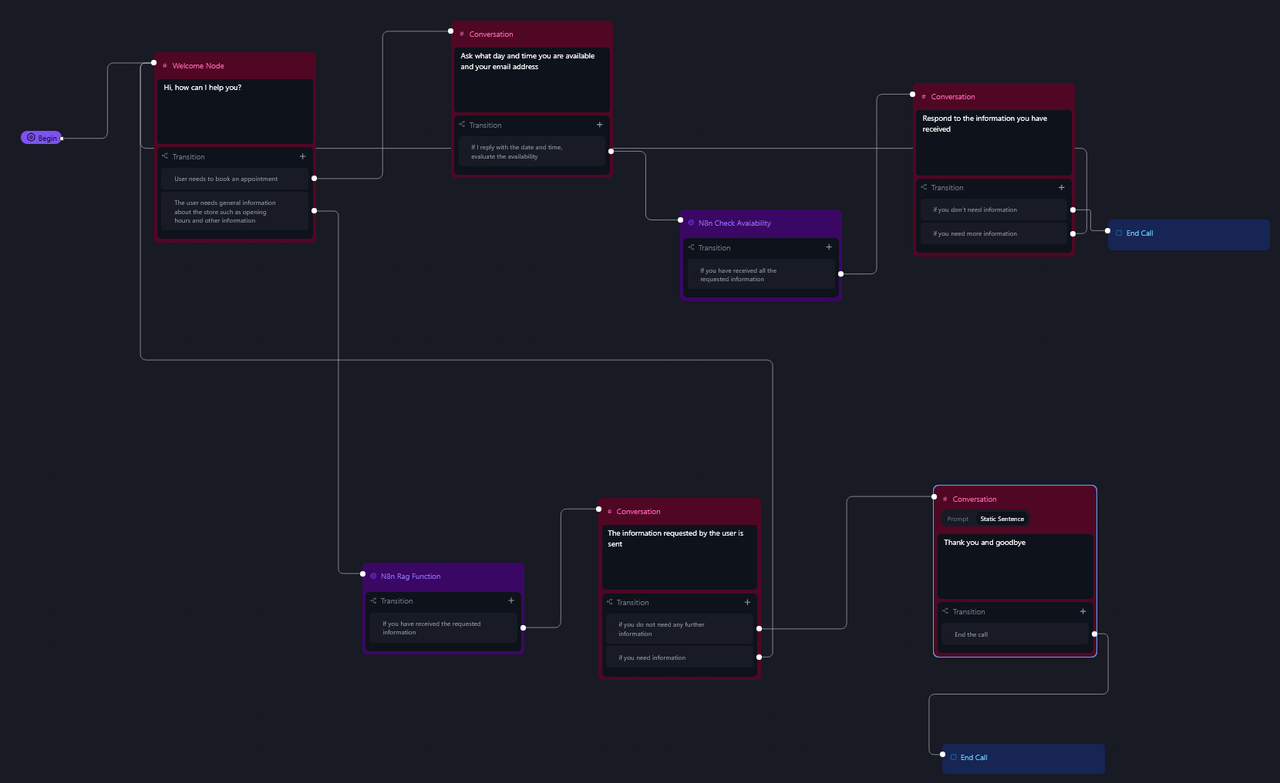\n- Aggiungere 2 funzioni (una per RAG e una per il Booking) e inserire l'url apposito ricavato dai webhook di n8n \"n8n_rag_function\" e \"n8n_check_available\"\n\n"
},
"typeVersion": 1
},
{
"id": "98de797e-56d8-42b4-85a5-245ae7d086db",
"name": "Sticky Note1",
"type": "n8n-nodes-base.stickyNote",
"position": [
-340,
-100
],
"parameters": {
"color": 5,
"width": 1220,
"content": "# STEP 4\nIntercept the \"end call\" event and get the full call transcript\n- Add your CHAT_ID in Telegram node"
},
"typeVersion": 1
},
{
"id": "ccf11ce4-3bc4-46bd-a71e-12e59d7a2504",
"name": "n8n_check_available",
"type": "n8n-nodes-base.webhook",
"position": [
1120,
100
],
"webhookId": "4dcd68b1-91d3-40bc-8aa6-c681126752b2",
"parameters": {
"path": "4dcd68b1-91d3-40bc-8aa6-c681126752b2",
"options": {},
"httpMethod": "POST",
"responseMode": "lastNode"
},
"typeVersion": 2
},
{
"id": "ddc50779-c0cf-4862-87b9-e187d1ab19a5",
"name": "When clicking ‘Test workflow’",
"type": "n8n-nodes-base.manualTrigger",
"position": [
-400,
-940
],
"parameters": {},
"typeVersion": 1
},
{
"id": "fd6f36d4-c8b3-4643-8df9-a775d94946d9",
"name": "Qdrant Vector Store",
"type": "@n8n/n8n-nodes-langchain.vectorStoreQdrant",
"position": [
580,
-820
],
"parameters": {
"mode": "insert",
"options": {},
"qdrantCollection": {
"__rl": true,
"mode": "id",
"value": "="
}
},
"credentials": {
"qdrantApi": {
"id": "iyQ6MQiVaF3VMBmt",
"name": "QdrantApi account"
}
},
"typeVersion": 1
},
{
"id": "3c4f9805-57e7-4662-ab12-8bedc5e5a815",
"name": "Create collection",
"type": "n8n-nodes-base.httpRequest",
"position": [
-100,
-1080
],
"parameters": {
"url": "https://QDRANTURL/collections/COLLECTION",
"method": "POST",
"options": {},
"jsonBody": "{\n \"filter\": {}\n}",
"sendBody": true,
"sendHeaders": true,
"specifyBody": "json",
"authentication": "genericCredentialType",
"genericAuthType": "httpHeaderAuth",
"headerParameters": {
"parameters": [
{
"name": "Content-Type",
"value": "application/json"
}
]
}
},
"credentials": {
"httpHeaderAuth": {
"id": "qhny6r5ql9wwotpn",
"name": "Qdrant API (Hetzner)"
}
},
"typeVersion": 4.2
},
{
"id": "b5fdbd4d-0cc9-4b5c-8aa8-b7fe6fd0f3b4",
"name": "Refresh collection",
"type": "n8n-nodes-base.httpRequest",
"position": [
-100,
-820
],
"parameters": {
"url": "https://QDRANTURL/collections/COLLECTION/points/delete",
"method": "POST",
"options": {},
"jsonBody": "{\n \"filter\": {}\n}",
"sendBody": true,
"sendHeaders": true,
"specifyBody": "json",
"authentication": "genericCredentialType",
"genericAuthType": "httpHeaderAuth",
"headerParameters": {
"parameters": [
{
"name": "Content-Type",
"value": "application/json"
}
]
}
},
"credentials": {
"httpHeaderAuth": {
"id": "qhny6r5ql9wwotpn",
"name": "Qdrant API (Hetzner)"
}
},
"typeVersion": 4.2
},
{
"id": "c2f5ded2-adcb-4c50-95e6-94e54a7c2116",
"name": "Get folder",
"type": "n8n-nodes-base.googleDrive",
"position": [
120,
-820
],
"parameters": {
"filter": {
"driveId": {
"__rl": true,
"mode": "list",
"value": "My Drive",
"cachedResultUrl": "https://drive.google.com/drive/my-drive",
"cachedResultName": "My Drive"
},
"folderId": {
"__rl": true,
"mode": "id",
"value": "=test-whatsapp"
}
},
"options": {},
"resource": "fileFolder"
},
"credentials": {
"googleDriveOAuth2Api": {
"id": "HEy5EuZkgPZVEa9w",
"name": "Google Drive account (n3w.it)"
}
},
"typeVersion": 3
},
{
"id": "640ede03-46fc-44a3-a9e8-29118036d64f",
"name": "Download Files",
"type": "n8n-nodes-base.googleDrive",
"position": [
340,
-820
],
"parameters": {
"fileId": {
"__rl": true,
"mode": "id",
"value": "={{ $json.id }}"
},
"options": {
"googleFileConversion": {
"conversion": {
"docsToFormat": "text/plain"
}
}
},
"operation": "download"
},
"credentials": {
"googleDriveOAuth2Api": {
"id": "HEy5EuZkgPZVEa9w",
"name": "Google Drive account (n3w.it)"
}
},
"typeVersion": 3
},
{
"id": "ff40b36c-3092-43fc-a001-9683b0e33460",
"name": "Embeddings OpenAI",
"type": "@n8n/n8n-nodes-langchain.embeddingsOpenAi",
"position": [
560,
-620
],
"parameters": {
"options": {}
},
"credentials": {
"openAiApi": {
"id": "4zwP0MSr8zkNvvV9",
"name": "OpenAi account"
}
},
"typeVersion": 1.1
},
{
"id": "cfc6a14a-1445-4d38-8fbb-3dc3c7bfff8b",
"name": "Default Data Loader",
"type": "@n8n/n8n-nodes-langchain.documentDefaultDataLoader",
"position": [
740,
-620
],
"parameters": {
"options": {},
"dataType": "binary"
},
"typeVersion": 1
},
{
"id": "38a49484-82f0-4520-ba03-47edef117cd8",
"name": "Token Splitter",
"type": "@n8n/n8n-nodes-langchain.textSplitterTokenSplitter",
"position": [
700,
-460
],
"parameters": {
"chunkSize": 300,
"chunkOverlap": 30
},
"typeVersion": 1
},
{
"id": "62726443-9c09-4ee7-becb-789982bc2e9b",
"name": "Sticky Note3",
"type": "n8n-nodes-base.stickyNote",
"position": [
100,
-1140
],
"parameters": {
"color": 6,
"width": 880,
"height": 220,
"content": "# STEP 1\n\n## Create Qdrant Collection\nChange:\n- QDRANTURL\n- COLLECTION"
},
"typeVersion": 1
},
{
"id": "5f52d12f-6bbe-468c-b23f-356e0675b15a",
"name": "Sticky Note4",
"type": "n8n-nodes-base.stickyNote",
"position": [
-120,
-880
],
"parameters": {
"color": 4,
"width": 620,
"height": 400,
"content": "# STEP 2\n\n\n\n\n\n\n\n\n\n\n\n\n## Documents vectorization with Qdrant and Google Drive\nChange:\n- QDRANTURL\n- COLLECTION"
},
"typeVersion": 1
},
{
"id": "08525507-990d-43f3-b2d3-6d73bc2aed84",
"name": "Set call fields",
"type": "n8n-nodes-base.set",
"position": [
140,
120
],
"parameters": {
"options": {},
"assignments": {
"assignments": [
{
"id": "15b079b9-e36d-4c9b-8ca4-30bf858ce75b",
"name": "Transcript",
"type": "string",
"value": "={{ $json.body.call.transcript }}"
},
{
"id": "f1cbced3-bd9c-4d8f-bd81-060406ff27b0",
"name": "Duration (sec)",
"type": "string",
"value": "={{ $('n8n_call').item.json.body.call.call_cost.total_duration_seconds }}"
},
{
"id": "829ee367-1f5e-4d66-9818-8a27344d7e79",
"name": "From",
"type": "string",
"value": "={{ $('n8n_call').item.json.body.call.from_number }}"
},
{
"id": "38e9e856-d87d-4c23-8486-4ebbac2da595",
"name": "To",
"type": "string",
"value": "={{ $('n8n_call').item.json.body.call.to_number }}"
},
{
"id": "4209d6d3-4881-4296-a1db-fff0c14addda",
"name": "Cost ",
"type": "string",
"value": "={{ $('n8n_call').item.json.body.call.call_cost.combined_cost }}"
},
{
"id": "3c871d3b-95b5-493a-b3fe-3c9bf06a0d62",
"name": "Telephony Identifier",
"type": "string",
"value": "={{ $('n8n_call').item.json.body.call.telephony_identifier.twilio_call_sid }}"
},
{
"id": "0a926748-8aff-4dd7-a252-516f3339210a",
"name": "Disconnection reason",
"type": "string",
"value": "={{ $json.body.call.disconnection_reason }}"
},
{
"id": "9c88eafc-4370-47ad-ad98-d14767c137d0",
"name": "Recording url",
"type": "string",
"value": "={{ $json.body.call.recording_url }}"
},
{
"id": "a737a3bd-c871-4273-85b8-8e423bf7c443",
"name": "Public log url",
"type": "string",
"value": "={{ $json.body.call.public_log_url }}"
}
]
}
},
"typeVersion": 3.4
},
{
"id": "db21e42c-ff87-45ad-a228-77ce4c9c6b0c",
"name": "Extract key points",
"type": "@n8n/n8n-nodes-langchain.chainLlm",
"position": [
400,
120
],
"parameters": {
"text": "=To: {{ $json.To }}\n\nComplete transcript:\n{{ $json.Transcript }} ",
"messages": {
"messageValues": [
{
"message": "=You are a specialized AI assistant responsible for analyzing complete voice conversation transcripts. Your task is to create concise summaries that extract the essential information from these conversations.\n\nInput: You will receive the complete transcript of a voice conversation between two or more participants.\n\nTask:\n1. Analyze the entire conversation transcript carefully.\n2. Identify and extract the most important key points discussed.\n3. Create a clear, structured summary that captures the essential information.\n4. Highlight any decisions made, action items agreed upon, or critical information shared.\n5. Maintain objectivity in your summary, avoiding interpretation or judgment.\n\nOutput format:\n- Begin with a brief overview of the conversation (1-2 sentences)\n- List the key points in bullet format\n- Include a separate \"Action Items\" section if any tasks or follow-ups were mentioned\n- Keep your summary concise while ensuring all important information is captured\n\nRemember that accuracy is paramount. Focus on extracting what was explicitly stated rather than inferring unstated meanings. If something is unclear in the transcript, note it as such rather than guessing."
}
]
},
"promptType": "define",
"hasOutputParser": true
},
"typeVersion": 1.6
},
{
"id": "0c6c8765-d28f-4398-aa0e-8f65879cc740",
"name": "Concert start date",
"type": "@n8n/n8n-nodes-langchain.chainLlm",
"position": [
1420,
100
],
"parameters": {
"text": "=Convert this date to a compatible format for Google Calendar APIs for the start date, and for the end date add 1 hour to the start date.\n\nHere is the start date:\n{{ $json.body.args.date }}",
"promptType": "define",
"hasOutputParser": true
},
"typeVersion": 1.6
},
{
"id": "0b33c34a-f61c-4aab-8315-600da2da3281",
"name": "Sticky Note2",
"type": "n8n-nodes-base.stickyNote",
"position": [
1100,
-100
],
"parameters": {
"color": 5,
"width": 1100,
"content": "# STEP 5\nIf required, create the event in the calendar\n- Enter the title and description of the event"
},
"typeVersion": 1
},
{
"id": "138555e5-b62b-4f59-b223-c73611e5dece",
"name": "Sticky Note5",
"type": "n8n-nodes-base.stickyNote",
"position": [
-360,
520
],
"parameters": {
"color": 5,
"width": 1220,
"content": "# STEP 6\nIf required retrive the informations by RAG system"
},
"typeVersion": 1
},
{
"id": "65d998a1-b31b-4463-be9b-0b27448f9026",
"name": "Retrive Agent",
"type": "@n8n/n8n-nodes-langchain.agent",
"position": [
60,
720
],
"parameters": {
"text": "={{ $json.body.args.query }}",
"agent": "conversationalAgent",
"options": {
"systemMessage": "You are an AI-powered assistant for an electronics store. Answer in Italian. Your primary goal is to assist customers by providing accurate and helpful information about products, troubleshooting tips, and general support. Use the provided knowledge base (retrieved documents) to answer questions with precision and professionalism.\n\n**Guidelines**:\n1. **Product Information**:\n - Provide detailed descriptions of products, including specifications, features, and compatibility.\n - Highlight key selling points and differences between similar products.\n - Mention availability, pricing, and promotions if applicable.\n\n2. **Technical Support**:\n - Offer step-by-step troubleshooting guides for common issues.\n - Suggest solutions for setup, installation, or configuration problems.\n - If the issue is complex, recommend contacting the store’s support team for further assistance.\n\n3. **Customer Service**:\n - Respond politely and professionally to all inquiries.\n - If a question is unclear, ask for clarification to provide the best possible answer.\n - For order-related questions (e.g., status, returns, or cancellations), guide customers on how to proceed using the store’s systems.\n\n4. **Knowledge Base Usage**:\n - Always reference the provided knowledge base (retrieved documents) to ensure accuracy.\n - If the knowledge base does not contain relevant information, inform the customer and suggest alternative resources or actions.\n\n5. **Tone and Style**:\n - Use a friendly, approachable, and professional tone.\n - Avoid technical jargon unless the customer demonstrates familiarity with the topic.\n - Keep responses concise but informative.\n\n**Example Interactions**:\n1. **Product Inquiry**:\n - Customer: \"What’s the difference between the XYZ Smartwatch and the ABC Smartwatch?\"\n - AI: \"The XYZ Smartwatch features a longer battery life (up to 7 days) and built-in GPS, while the ABC Smartwatch has a brighter AMOLED display and supports wireless charging. Both are compatible with iOS and Android devices. Would you like more details on either product?\"\n\n2. **Technical Support**:\n - Customer: \"My wireless router isn’t connecting to the internet.\"\n - AI: \"Please try the following steps: 1) Restart your router and modem. 2) Ensure all cables are securely connected. 3) Check if the router’s LED indicators show a stable connection. If the issue persists, you may need to reset the router to factory settings. Would you like a detailed guide for resetting your router?\"\n\n3. **Customer Service**:\n - Customer: \"How do I return a defective product?\"\n - AI: \"To return a defective product, please visit our Returns Portal on our website and enter your order number. You’ll receive a return label and instructions. If you need further assistance, our support team is available at support@electronicsstore.com.\"\n\n**Limitations**:\n- If the question is outside the scope of the knowledge base or requires human intervention, inform the customer and provide contact details for the appropriate department.\n- Do not provide speculative or unverified information. Always rely on the knowledge base or direct the customer to official resources."
},
"promptType": "define"
},
"typeVersion": 1.7
},
{
"id": "a98a4ed7-4ebc-4d40-8aaa-70de751bc15f",
"name": "Sticky Note6",
"type": "n8n-nodes-base.stickyNote",
"position": [
-380,
-1600
],
"parameters": {
"color": 3,
"width": 2580,
"height": 360,
"content": "# Create your first AI Phone Agent\n\nBuild, test, deploy, and monitor AI phone agents. Retell is a comprehensive platform for building, testing, deploying, and monitoring reliable AI phone agents.\nConversation flow agent allows you to create multiple nodes to handle different scenarios in the conversation. It provides more fine-grained control over the conversation flow compared to single / multi prompt agent, which unlocks the ability to handle more complex scenarios.\n\nThis Workflow simulates an AI-powered phone agent with two main functions:\n\n📅 Appointment Booking – It can schedule appointments directly into Google Calendar.\n\n🧠 RAG-based Information Retrieval – It provides answers using a Retrieval-Augmented Generation (RAG) system. For example, it can respond to questions such as store opening hours, return policies, or product details.\n\nThe guide also explains how to purchase a dedicated phone number (with a +1 prefix) and link it to the AI agent. This setup is cost-effective, as it uses a free $10 credit to operate without additional charges in the beginning."
},
"typeVersion": 1
}
],
"active": true,
"pinData": {},
"settings": {
"timezone": "Europe/Rome",
"callerPolicy": "workflowsFromSameOwner",
"executionOrder": "v1"
},
"versionId": "d78ac941-900b-49f5-a9a8-158effbd2479",
"connections": {
"RAG": {
"ai_tool": [
[
{
"node": "Retrive Agent",
"type": "ai_tool",
"index": 0
}
]
]
},
"Filter": {
"main": [
[
{
"node": "Set call fields",
"type": "main",
"index": 0
}
]
]
},
"n8n_call": {
"main": [
[
{
"node": "Filter",
"type": "main",
"index": 0
}
]
]
},
"Get folder": {
"main": [
[
{
"node": "Download Files",
"type": "main",
"index": 0
}
]
]
},
"Retrive Agent": {
"main": [
[
{
"node": "Respond to Webhook",
"type": "main",
"index": 0
}
]
]
},
"Download Files": {
"main": [
[
{
"node": "Qdrant Vector Store",
"type": "main",
"index": 0
}
]
]
},
"Token Splitter": {
"ai_textSplitter": [
[
{
"node": "Default Data Loader",
"type": "ai_textSplitter",
"index": 0
}
]
]
},
"Google Calendar": {
"main": [
[]
]
},
"Set call fields": {
"main": [
[
{
"node": "Extract key points",
"type": "main",
"index": 0
}
]
]
},
"n8n_rag_function": {
"main": [
[
{
"node": "Retrive Agent",
"type": "main",
"index": 0
}
]
]
},
"Embeddings OpenAI": {
"ai_embedding": [
[
{
"node": "Qdrant Vector Store",
"type": "ai_embedding",
"index": 0
}
]
]
},
"OpenAI Chat Model": {
"ai_languageModel": [
[
{
"node": "Extract key points",
"type": "ai_languageModel",
"index": 0
}
]
]
},
"Concert start date": {
"main": [
[
{
"node": "Google Calendar",
"type": "main",
"index": 0
}
]
]
},
"Embeddings OpenAI2": {
"ai_embedding": [
[
{
"node": "Retrive Qdrant Vector Store",
"type": "ai_embedding",
"index": 0
}
]
]
},
"Extract key points": {
"main": [
[
{
"node": "Telegram",
"type": "main",
"index": 0
}
]
]
},
"OpenAI Chat Model1": {
"ai_languageModel": [
[
{
"node": "RAG",
"type": "ai_languageModel",
"index": 0
}
]
]
},
"OpenAI Chat Model2": {
"ai_languageModel": [
[
{
"node": "Retrive Agent",
"type": "ai_languageModel",
"index": 0
}
]
]
},
"OpenAI Chat Model3": {
"ai_languageModel": [
[
{
"node": "Concert start date",
"type": "ai_languageModel",
"index": 0
}
]
]
},
"Refresh collection": {
"main": [
[
{
"node": "Get folder",
"type": "main",
"index": 0
}
]
]
},
"Default Data Loader": {
"ai_document": [
[
{
"node": "Qdrant Vector Store",
"type": "ai_document",
"index": 0
}
]
]
},
"n8n_check_available": {
"main": [
[
{
"node": "Concert start date",
"type": "main",
"index": 0
}
]
]
},
"Structured Output Parser": {
"ai_outputParser": [
[
{
"node": "Extract key points",
"type": "ai_outputParser",
"index": 0
}
]
]
},
"Structured Output Parser1": {
"ai_outputParser": [
[
{
"node": "Concert start date",
"type": "ai_outputParser",
"index": 0
}
]
]
},
"Retrive Qdrant Vector Store": {
"ai_vectorStore": [
[
{
"node": "RAG",
"type": "ai_vectorStore",
"index": 0
}
]
]
},
"When clicking ‘Test workflow’": {
"main": [
[
{
"node": "Create collection",
"type": "main",
"index": 0
},
{
"node": "Refresh collection",
"type": "main",
"index": 0
}
]
]
}
}
}Pour qui est ce workflow ?
Ce workflow s'adresse aux entreprises de taille moyenne à grande, notamment celles disposant d'équipes de support client ou de centres d'appels. Il est conçu pour des utilisateurs ayant un niveau technique intermédiaire, cherchant à intégrer des solutions d'automatisation dans leurs processus de gestion des appels.
Problème résolu
Ce workflow résout le problème de la lenteur et de l'inefficacité dans la gestion des appels entrants. En automatisant le traitement des demandes, il élimine les frustrations liées aux temps d'attente et aux réponses inappropriées. Les utilisateurs bénéficient d'une communication plus rapide et pertinente, ce qui renforce la fidélité des clients et améliore l'image de marque de l'entreprise.
Étapes du workflow
Étape 1 : Le workflow débute avec un webhook qui reçoit les requêtes des utilisateurs. Étape 2 : Un filtre évalue les conditions à respecter pour le traitement. Étape 3 : Les modèles de langage d'OpenAI génèrent des réponses adaptées. Étape 4 : Les données sont stockées dans un vecteur Qdrant pour un accès rapide. Étape 5 : Les réponses sont envoyées via Telegram ou intégrées dans Google Calendar pour la planification. Étape 6 : Les informations sont analysées et les résultats sont renvoyés au webhook pour finaliser le processus.
Guide de personnalisation du workflow n8n
Pour personnaliser ce workflow, commencez par ajuster l'URL du webhook pour qu'elle corresponde à votre système. Modifiez les paramètres des modèles OpenAI pour adapter les réponses en fonction de votre secteur d'activité. Vous pouvez également changer les identifiants de chat Telegram pour diriger les messages vers le bon canal. Pensez à configurer les options de Google Calendar pour synchroniser les rendez-vous selon vos besoins. Enfin, assurez-vous de sécuriser les données en configurant les options d'authentification appropriées pour chaque service utilisé.